
Begin your journey in Türkiye with us.
We combined the knowledge of expert local guides with the speed of AI.
✦ AI-POWERED TRAVEL GUIDE
We combined the knowledge of expert local guides with the speed of AI.
We chose every place in the app one by one. Our criteria are clear: the highest-rated and most-visited spots on Google. New cities are added regularly.

Two continents. A thousand stories.
HAGIA SOPHIA · BOSPHORUS · GRAND BAZAAR

From fairy chimneys to underground cities.

Roman gates, the old harbour, the clear waters of the Mediterranean.

Bodrum, Marmaris, Ölüdeniz — the Aegean at its bluest.
Type what you need into the app's search box and let GuideUp guide you.
Up-to-date information, trusted content. All venue information is verified at regular intervals. When you need real-time information, our AI steps in with a live web search.
From culture to emergencies, from routes to tax refunds, every module has its own AI specialised in its field. This whole smart system is designed to be with you at every moment of your trip.

Every piece has a history, and sometimes a hidden story. Tourist Eye doesn't leave you with encyclopaedia facts. It turns information drawn first from academic sources into a living story and whispers it to you in a specially chosen voice.
How it works ›
Every country has its unwritten rules, and in Türkiye many customs, from hospitality and bargaining to table manners and coffee fortune-telling, can be surprising at first. Culture Guide lets you ask about anything you're curious about, just as you would ask a local friend. Every answer brings you one step closer to the local culture.
How it works ›
Different languages, one natural flow. Talk & Translate relays each sentence, spoken in turn, both aloud and on screen. Because the text appears on screen, both sides can be sure the translation is right. With 64 languages to choose from, not sharing a language is no longer a reason to end a conversation.
How it works ›
A couple of hours or the whole day, it's up to you. Pick your city, tick what you're into (history, beaches, food, nightlife and so on) and your route is built in seconds — entirely from places already in the app. Have more time? There are ready-made routes too: food trails, Ottoman heritage, hiking, quiet coves…
How it works ›
Medical, police, fire and consulates on one screen. Call 112 — Türkiye's single emergency number — with one tap, or find the nearest state hospital, pharmacy and all-night pharmacy from where you're standing. Something unexpected happened? Write or speak to Emergency Support; it will point you to 112 first, and if it isn't a real emergency it will give you the help you need.
How it works ›
Shop at a participating store in Türkiye and you can claim back the VAT on your way home. Most visitors never hear about it, and because they don't, they lose a refund they were entitled to. Read how it works step by step, find out which companies handle it, and get help if you run into trouble.
How it works ›
Toilets, ATMs, currency exchange, shops, post offices, free wifi, charging points, tourist information, accessibility services, baby changing rooms. All small things — until you need one in a city you don't know. You'll reach the nearest one in a single tap; you can pick up your SIM card here too.
How it works ›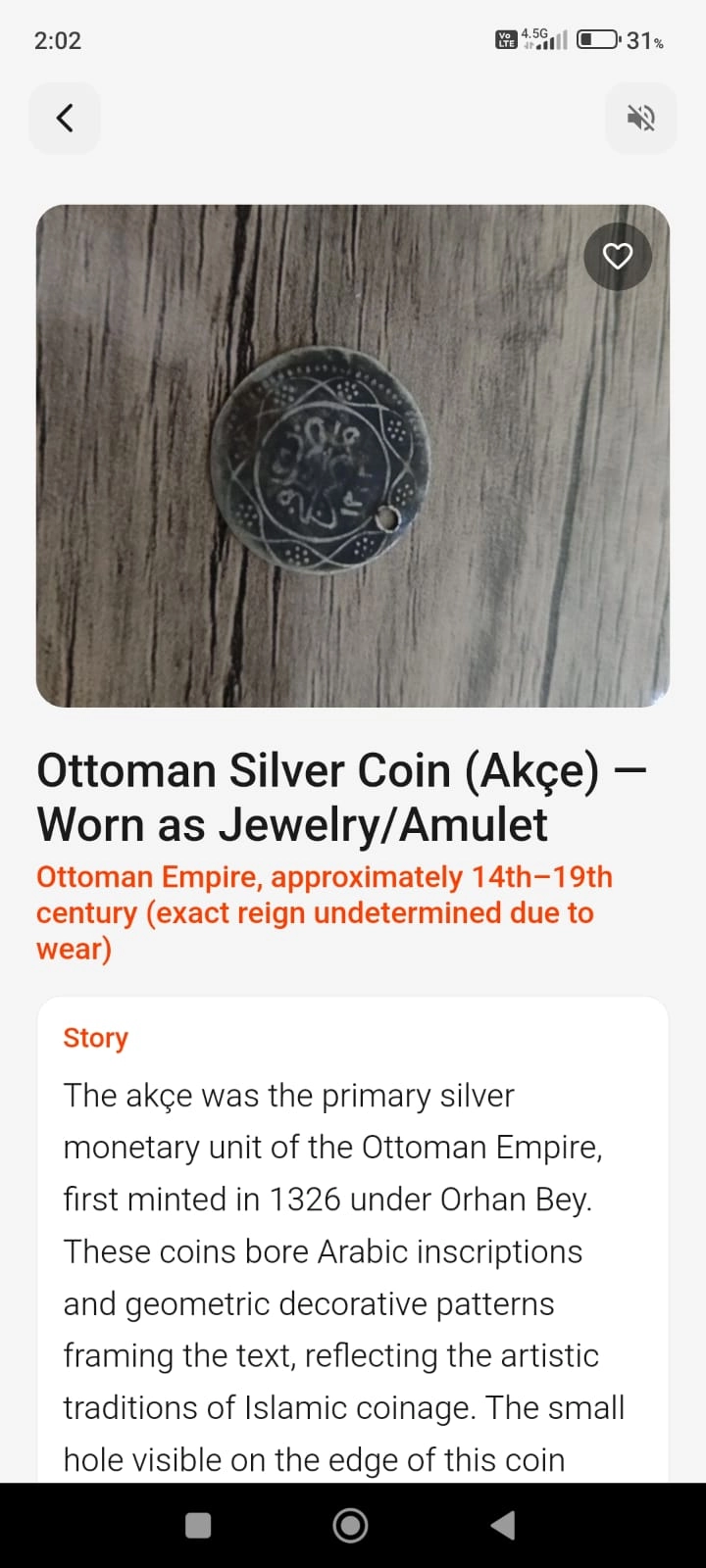
Something caught your eye at a museum or an ancient site, and you have no idea what it is. The sign next to it is either too brief or missing altogether. What's its story — who made it, and when? That's exactly where Tourist Eye comes in: the story behind a historic object is now one photograph away.
Open the module: Tap the Tourist Eye icon from the home screen, or from the page of the museum or ancient site you're at.
Upload a photo: Take a picture of the object or choose one from your gallery. (The sharper the detail, the more accurate the analysis.)
Tap Analyse: The AI searches the Ministry of Culture and Tourism, UNESCO, museum archives and academic publications first, and matches verified information about the object.
Read the story: The full account comes back in writing and out loud. Below the text you'll see the sources it used, and whether the information came from an academic or official source or from general ones.
It knows its limits: Tourist Eye is built for historic objects, architecture and museum pieces. Point it at something with no historic value and it will tell you what it is, then politely remind you what it's for.
Save and share: Save any analysis you like, share it with friends, or add it to Memories in your Account page.
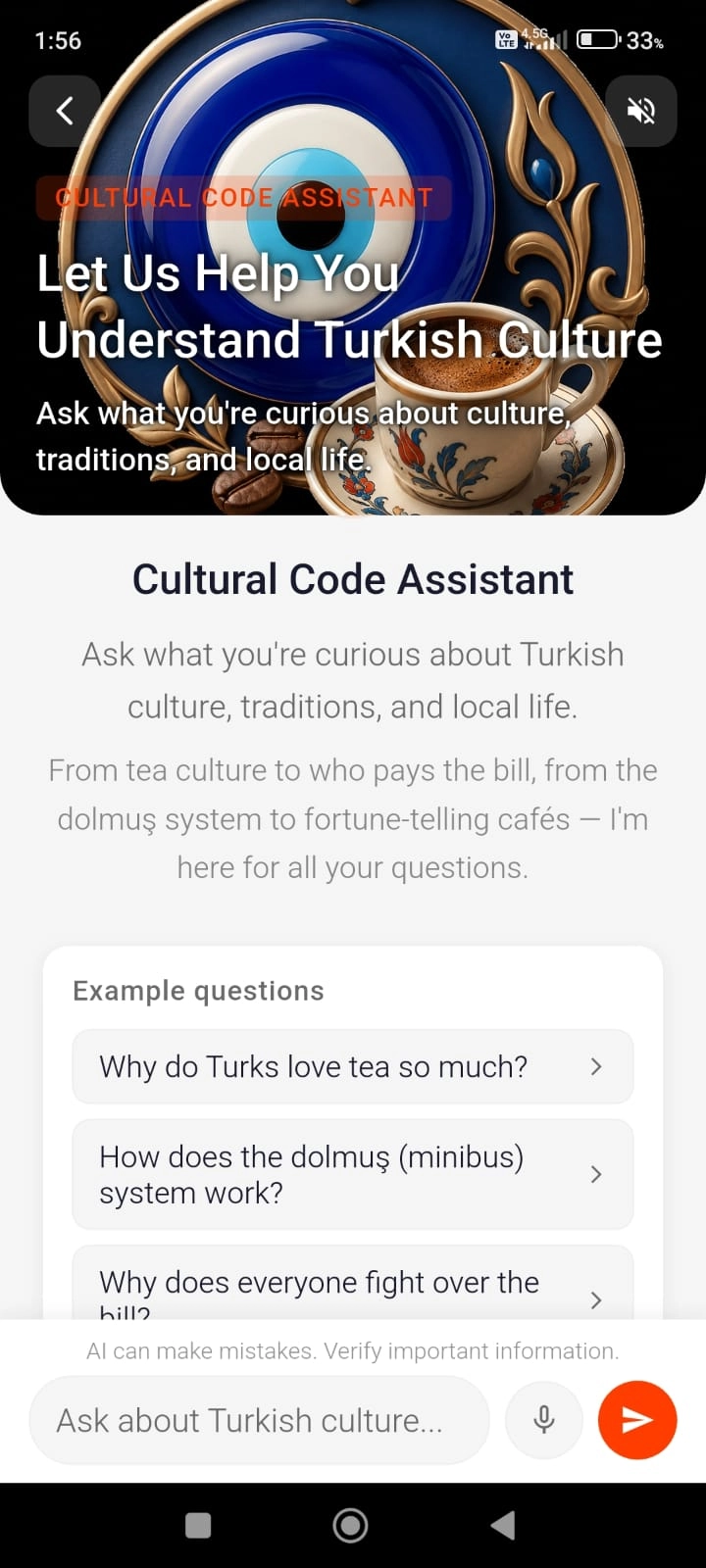
In a country you don't know, you'll come across things you find odd with no one to ask. "Why does everyone keep offering tea?", "Who's supposed to pay the bill?", "How do you pass money forward on a dolmuş?" — the Culture Guide answers exactly these. Ask the way you'd ask a Turkish friend and get a straight, friendly answer.
Open the module: Open the Culture Guide from the home screen, or from the page of the city you're in.
Ask your question: Type it or say it out loud. You can also start by tapping one of the example questions on screen.
Read the answer: Read it or listen to it. Your chat history is kept, so you can come back to it later — or clear it whenever you like.
It answers by location: It knows where you are. The same question may be answered differently in İzmir than in Cappadocia, according to local custom.
It checks what changes: For religious holidays, public holidays and seasonal events it goes to current calendars and sources rather than relying on memory.
Emergencies come first: Mention illness, theft or anything similar and it sends you straight to Emergency Help instead of offering general advice.
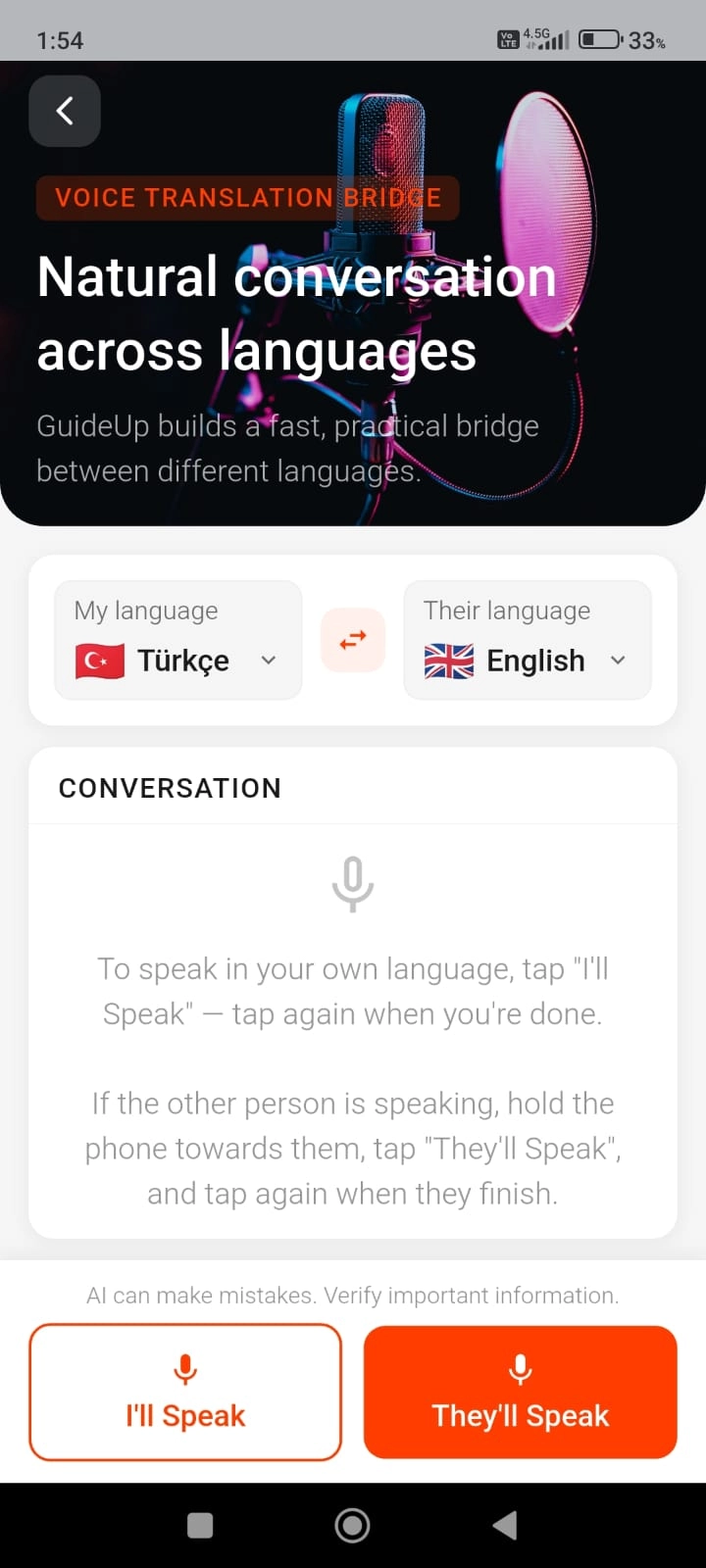
You and the person in front of you have no language in common; you don't speak theirs, they don't speak yours. Talk & Translate builds the bridge: you talk in your own language, they hear it in theirs. When they reply, you hear it in yours.
Choose the languages: Pick your language and theirs from 64 options. The button in the middle swaps them instantly.
You speak: When it's your turn, tap "I'll Speak" and talk. Tap "Done" when you've finished. The translation is read out loud and shown on screen in writing. In noisy places you can show them the text on screen.
Listen to their reply: Tap "They'll Speak" and hold the phone towards them. When they finish, tap "Done" — what they said is read back to you in your own language.
See it, not just hear it: Every exchange stays on screen in writing. If something is misheard, you can see what the app picked up and say it again more clearly.
Your chat history: Conversations are kept on screen; you can clear the history whenever you like.
Pronunciation handled: It says place and venue names for you. No need to attempt local names yourself — the phone says them properly and the driver or attendant understands.
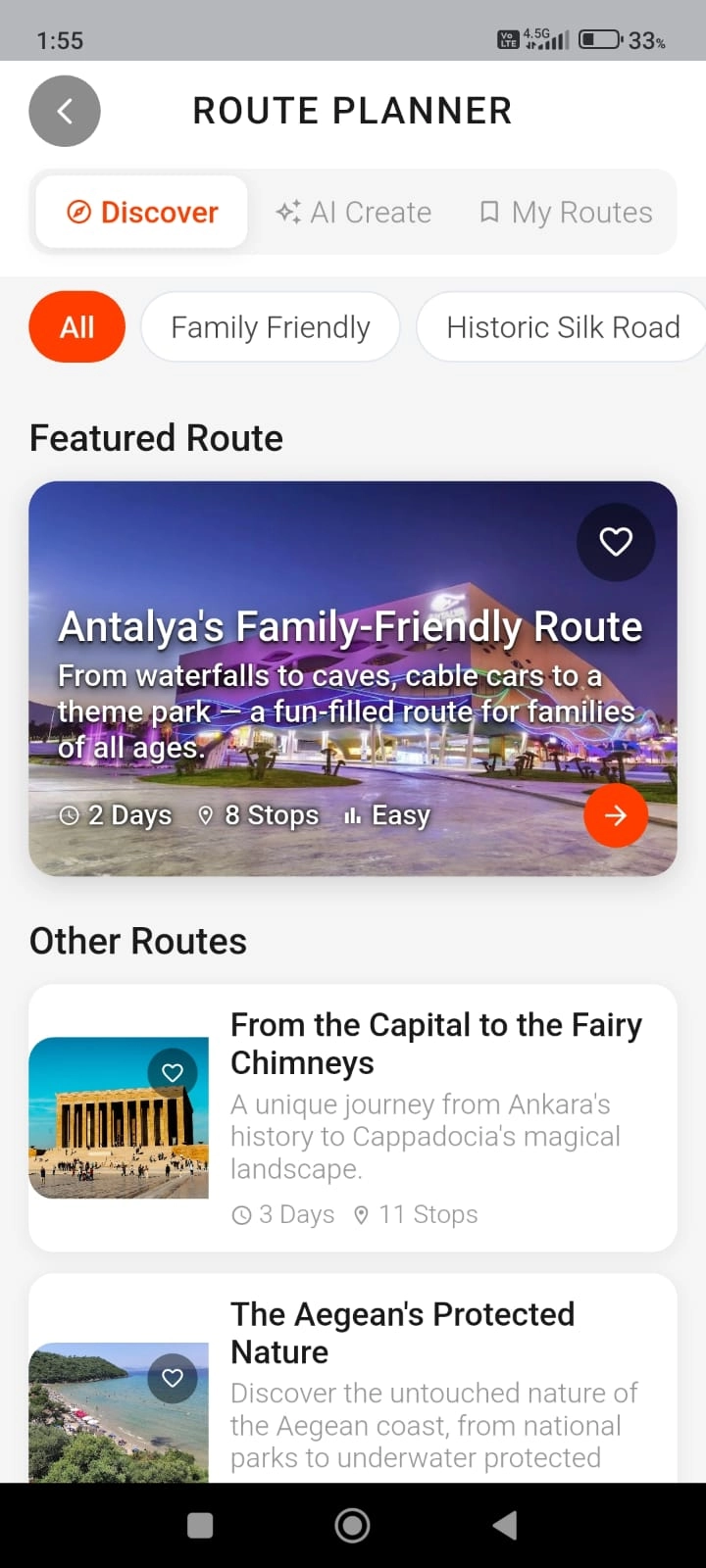
You've arrived in a city with only half a day and no idea where to begin. Most guides online were written for a different season or a different budget. The Route Planner either hands you a ready-made route or builds one around your time and your taste — showing which places to visit, and in what order.
Open the module: Tap Route Planner. Use the Discover tab to browse ready-made routes, or the Create tab to build a personalised one with AI.
Filter the ready-made routes: In Discover, filter by category, length, difficulty or city (food trails, Ottoman heritage, hiking, coastal routes and so on).
Set your criteria: For your own route, pick the city, tick what you're into (history, beaches, museums, nightlife and so on) and say how much time you have. Add any special requests as a note.
Build your route: The AI puts it together in seconds and saves it to the My Routes tab.
Follow it on the map: Open the route and the stops appear on the map, numbered in order. Tap any stop to read its notes or go to that place's full page.
Verified places only: Routes aren't assembled from random locations — every stop comes from the app's own database and has been checked beforehand.
Save and share: Save any ready-made route you like, and share the ones you create with whoever you're travelling with.
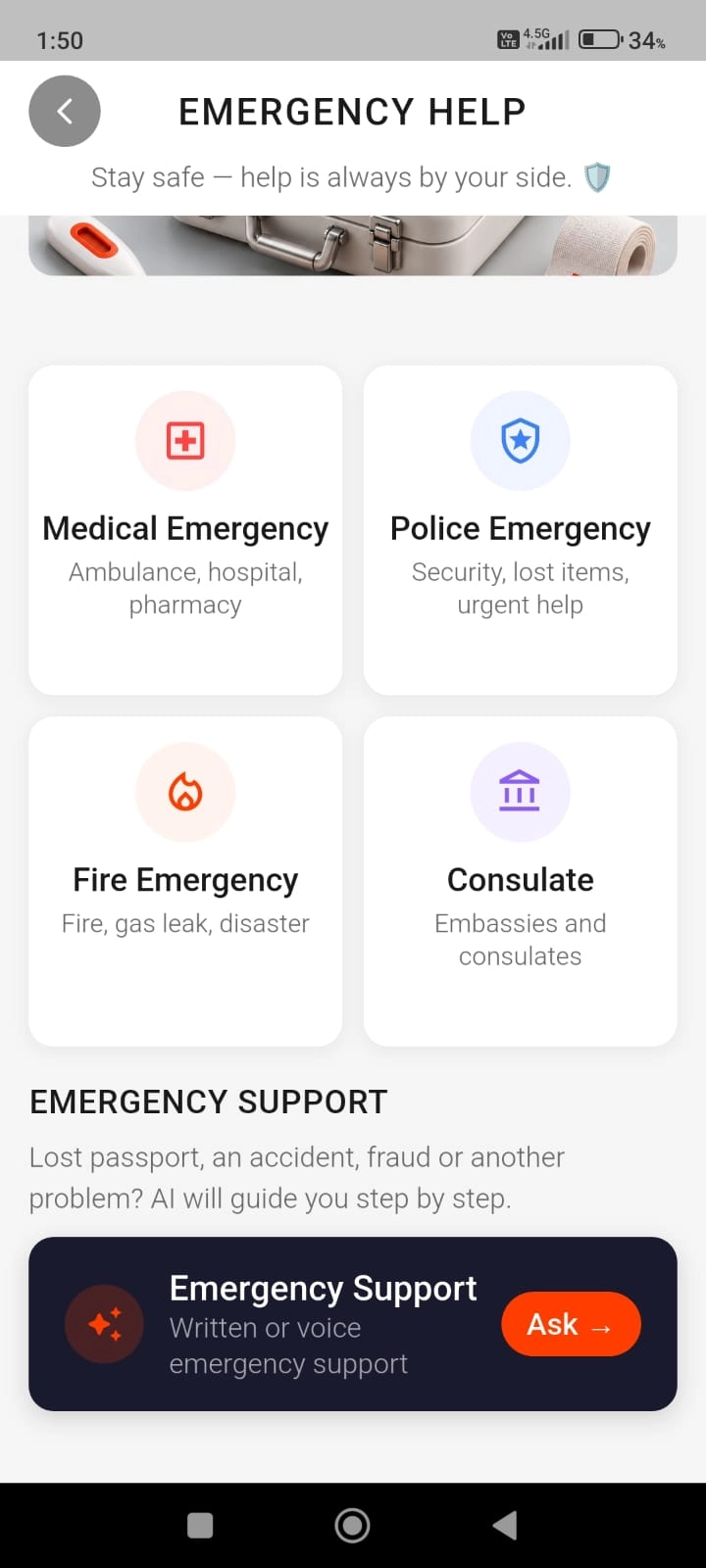
The hardest part of something going wrong abroad is not knowing who to call. Illness, an accident, a lost passport, a fire… Instead of hunting for a separate number for each, Emergency Help puts all the support and guidance you need on one screen.
Choose what you need: Tap whichever of the four applies: Medical, Police, Fire or Consulate.
Call 112 with one tap: 112 is Türkiye's single emergency number; the operator routes you straight to the right service.
Find medical services: Under Medical, see the nearest state hospitals, pharmacies and all-night pharmacies on the map, based on where you are.
Ask Emergency Support: If you're not sure what to do, write or describe your situation out loud. If the AI detects a genuine emergency it points you to 112 first; if it isn't urgent, it explains what to do step by step.
Reach your consulate: The consulate section lists your country's embassies and consulates in Türkiye, city by city.
Multilingual support and location sharing: The 112 emergency centre operates in Turkish, English, German, Russian and Arabic. Your location is sent automatically when you call.
All-night pharmacy finder: In Türkiye, pharmacies in every district take turns staying open through the night. The app shows you the nearest one currently open, directly on the map.
Privacy — nothing is recorded: What you share in an emergency is the most sensitive kind of information. Conversations in this module are not stored: your privacy is protected, and every emergency is assessed on its own, without being coloured by earlier conversations.
Always free: Emergency Help never counts against your daily allowance — free or premium, it's always completely free.
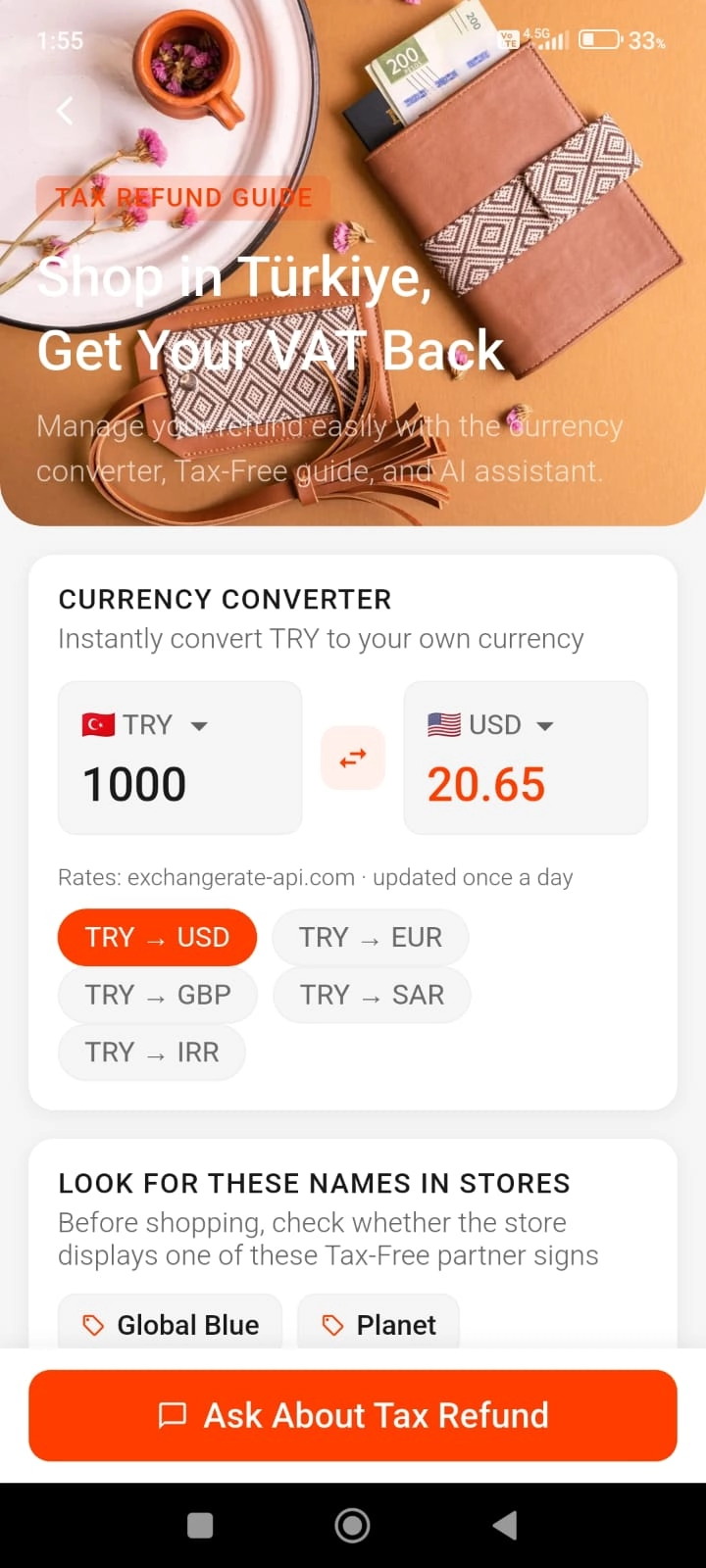
Foreign visitors who shop in Türkiye can claim back the VAT they paid when they head home. There are rules and steps to follow, though, and many travellers leave without the refund they were entitled to. This module walks you through the whole process, and the built-in currency converter lets you work out what you're spending in your own money.
Check the shop: Before you buy, look for a Tax-Free sign. The module lists the authorised operators, so you can confirm which one the shop works with.
Get your form filled in: Show your passport at the till and have the Tax-Free form completed at the time of purchase. (It can't be issued afterwards.)
Get it stamped at customs: At the airport, go to the customs desk before you check your bags in, show the goods and have your form stamped.
Collect your money: Hand the stamped form in at an authorised refund point and take your payment in cash or onto your card.
Ask the assistant: If you get stuck at any stage, write to the Tax Refund assistant or ask out loud.
Legal conditions: To claim, you must be a foreign national not resident in Türkiye, and the purchase must be at least 1000 TL plus VAT on a single invoice.
How much comes back: VAT is 10% on textiles and clothing and 20% on other goods. What you actually receive is calculated after the operator's commission and shown to you during the transaction.
Currency converter: Convert Turkish lira into your own currency to work out your spending; rates are updated once a day.
Your chat history: Conversations with the assistant are stored securely; you can clear the history whenever you like.
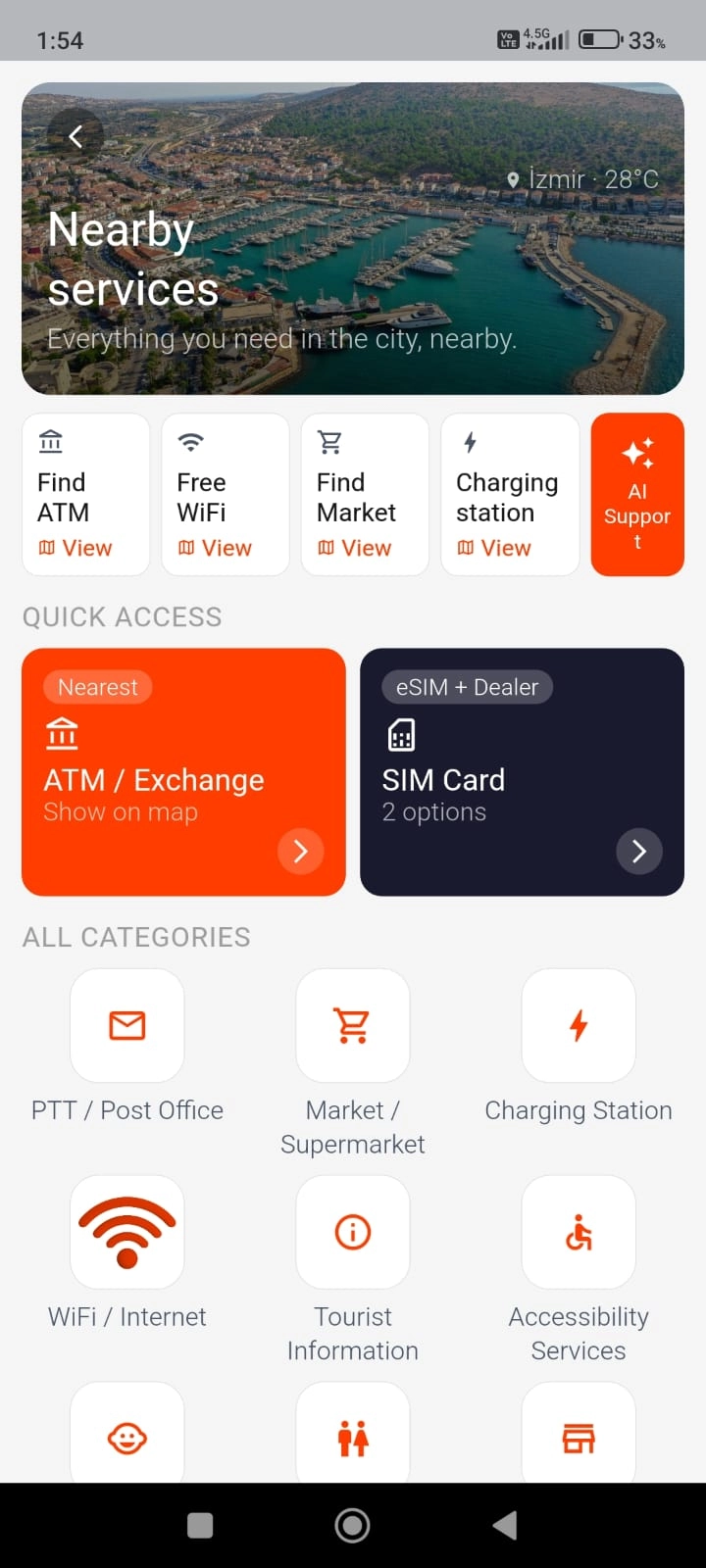
Nobody plans a trip thinking about where the nearest toilet or charging point is — until the moment arrives, and it becomes the most urgent thing of the day. Everything practical you might need in your first hours in the country, or out and about, is gathered in Daily Essentials on a single map.
Browse the categories: Eleven essentials in one place: Toilets, ATMs and currency exchange, SIM cards and eSIM, charging points, shops and supermarkets, free wifi, post and parcels, tourist information, accessibility services, baby and child facilities, and shopping centres.
Get there fast: The four most-needed categories sit at the top, ready to open on the map; the rest are under All Categories.
Sort out your SIM: In the SIM card section you can buy an eSIM instantly, or find the nearest physical dealers on the map.
Ask AI Support: For more on any category, or to look for something that isn't listed, write to the AI Support assistant.
Location access and weather: The module needs location access to show you the nearest options in order of distance. Once you allow it, your current city's weather also appears at the top of the page.
Map searches are free: Category lists and map searches don't count against your daily allowance; only the questions you put to AI Support come out of your daily quota.
Your chat history: Conversations with AI Support are stored; you can clear the history whenever you like.
On the free plan you get 5 questions a day. You also get one historic-object analysis and one route a day. Emergency Help is a human necessity, so it's completely free — subscribe or don't, that part is open to everyone.
See pricing →The app has two separate language settings, and each is chosen independently. The interface can be in one language while you talk to the AI assistants in a completely different one.
Menus, buttons and everything written in the app.
For the AI assistants and for Talk & Translate.
Keep the interface in English and ask your question in Japanese; the AI answers in Japanese. How you pair the two settings is entirely up to you.

Twenty kilometres outside Şanlıurfa, under a hill. It sat there for twelve thousand years.
10,000 BC. The ice has pulled back and the world is warming. People still live by hunting and gathering; farming hasn't begun, and not even the first villages have been built. Writing is another five thousand years away.
And in the middle of all this silence, on this hill, a step was taken that changed the course of human history.
Limestone pillars, T-shaped, up to five and a half metres tall — the largest weighing eight to ten tonnes. Set out in rough circles. Carved into them: scorpions, foxes, wild boar, snakes.
No metal tools. No wheel. No animals to pull anything.
The people who did this weren't farmers. They weren't a settled society either. They were hunter-gatherers. Until Göbeklitepe, the order was assumed to run the other way round — farming first, then villages, and only much later anything monumental. This broke the sequence.

The earliest structures have been dated to between 9500 and 9000 BC.
German Archaeological Institute · UNESCO World Heritage, 2018
Around 8000 BC these structures fell out of use. The fill layers contain limestone rubble, flint tools and animal bones; the great pillars were found upright and barely weathered, as though left there yesterday.
Whether this was a deliberate burial ritual or a natural landslide is still debated. Either way, the structures were protected from the elements for thousands of years because they lay beneath the earth.

Excavation reports, German Archaeological Institute
As of 2021, less than five per cent of the site had been excavated. Everything you can see is a fragment of what's down there.
Göbeklitepe isn't on its own, either. Karahantepe, Sayburç, Sefertepe — a dozen more sites across the same region, from the same era, built with the same T-shaped pillars. At Karahantepe alone, more than two hundred and fifty carved pillars have come out of the ground.
The digging is still going on. Every season turns up something.

Taş Tepeler Project — Istanbul University, Şanlıurfa Museum, German Archaeological Institute
Nearly everything you'll stand in front of in Türkiye has a sign beside it. What's written on the sign isn't even the beginning of the story.
GuideUp is free to use. Start with the core features straight away and begin exploring the moment you set foot in the city. When you want it without limits, a couple of taps takes you to the full version.
Just create an account
Hospitals, pharmacies, all-night pharmacies, police and consulates — none of it counts against your daily allowance.
Everything, no limits.
No question counter, no daily allowance to keep track of. Use it whenever and as much as you like.
Download the app →It's your personal AI guide inside the app. Ask it anything — "Where should I go?", "What should I eat?", "Is this place open at this hour?" It knows the city you're in and answers in your own language.
The five daily questions are a shared pool across the Travel Assistant, Culture Guide, Talk & Translate, Tax Refund and Daily Essentials (AI Support). You can split them between these tools however you like, and they reset automatically at midnight.
These two run a much heavier analysis in the background: Tourist Eye examines your photograph and searches academic and official sources, while the Route Planner weighs the city, your interests and your time together to build a plan for you. That's why their daily allowances are kept separate. Even so, the free allowance renews every day, so you can try both and see the difference on your trip.
No. There's no time limit on the free version — use it as long as you like. Only the daily allowance is capped, and that comes back every night.
The app opens offline and the places you've already looked at stay readable. Photographs and the AI tools need a connection. We're working on a way to download a whole city in advance and use it fully offline.
From inside the app. Payment goes through Google Play or the App Store — your card details never reach our servers.
From your Google Play or App Store account, whenever you like. Premium stays open until the end of the period you've paid for, then the account simply returns to the free version.
Istanbul, Nevşehir (Cappadocia), Antalya, Muğla, İzmir, Ankara, Çanakkale, Aydın, Bursa, Şanlıurfa, Denizli, Konya, Trabzon, Van and Rize. New cities are added regularly.
Every place in our database was chosen individually and filtered against real visitor reviews, local recommendations and ratings. When Tourist Eye analyses a historic object it draws on the Ministry of Culture and Tourism, UNESCO, museum archives and academic publications — and shows you the sources it used.
Your account details and anything you create in the app are stored; none of it is sold to third parties for advertising or marketing. You can delete your account permanently from inside the app at any time. The full details are in our Privacy Policy.
Didn't find your answer? Write to us at info@guideup.app.
Scan the QR code with your phone and download the app right away.
Thousands of checked places, AI that shows its sources, and routes built for you — all in your pocket.
GuideUp is in its final round of testing. The app launches on Google Play and the App Store in March 2027, ahead of the summer season. Want to hear the day we go live? Write to us at info@guideup.app
GuideUp came directly out of experience in the field. It was designed by watching, over years, where visitors actually get stuck, and by drawing on what local guides and people working in tourism know.
Our aim is simple: to remove the uncertainty and the question marks from travelling in Türkiye, whatever language you speak.
Not one location in our database came from an automated list. Every place across 15 cities was picked by hand; real visitor reviews, ratings and local recommendations were gone through carefully. More than 500 of them are historic sites and museums.
When Tourist Eye analyses an object, it also shows where the information came from: the Ministry of Culture and Tourism, UNESCO, museum archives and academic publications. You can see clearly whether the information came from an official source or from general ones.
The Route Planner doesn't invent places; it builds routes from verified, real locations. Whether you have two hours or a full day, it gives you a plan that makes the most of your time. For longer trips, the ready-made routes are always to hand.
Wrong turns, menus you can't read and hours lost to guesswork are over. Explore Türkiye on your own terms, entirely in your own language.